Skip to content
SkywardOps

Fleet operations for drones, trucks and robots

One control room for drones, yard trucks and inspection robots.

For operators of drones, yard trucks, and inspection robots who already know DroneDeploy, FlytBase, Skydio, and Percepto AIM. This product shows the fleet, the mission, live video, and inspection findings. The terminal stays in Portline.

No sign-in. Simulated fleet of 64 units. Nothing leaves your machine.

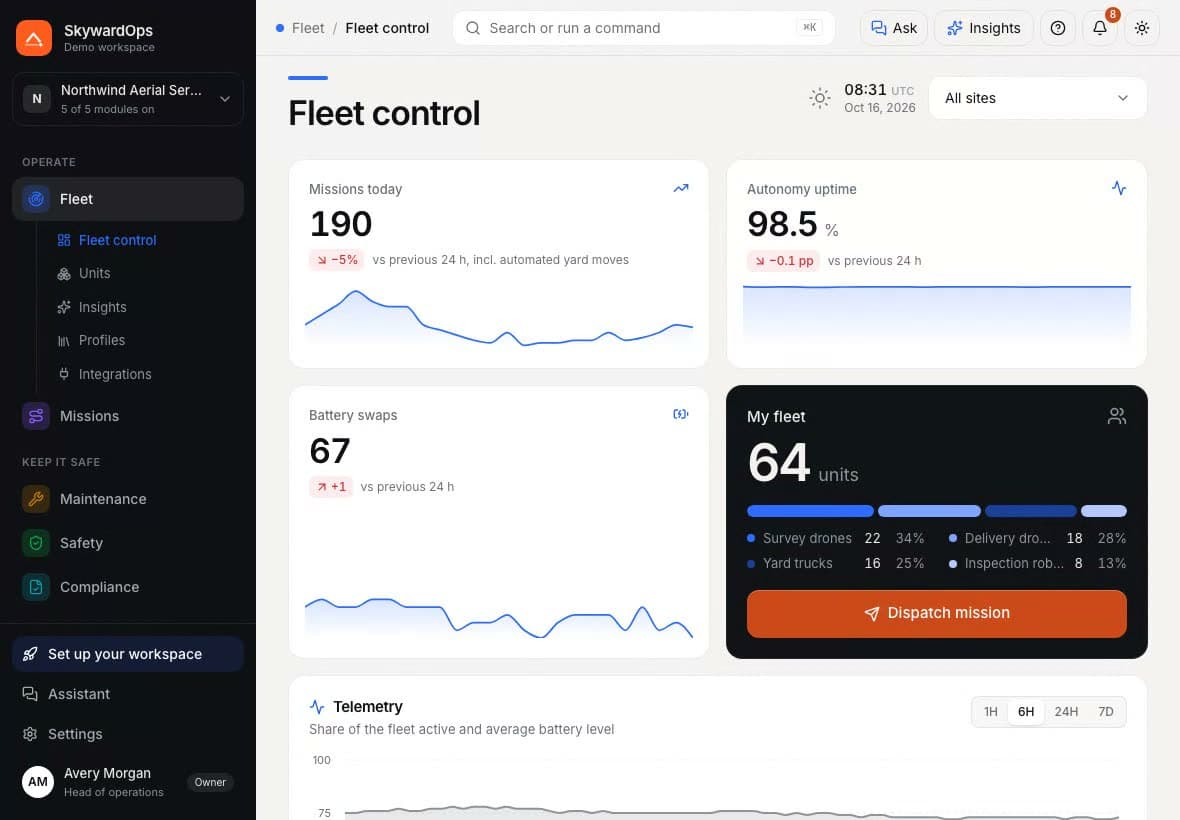
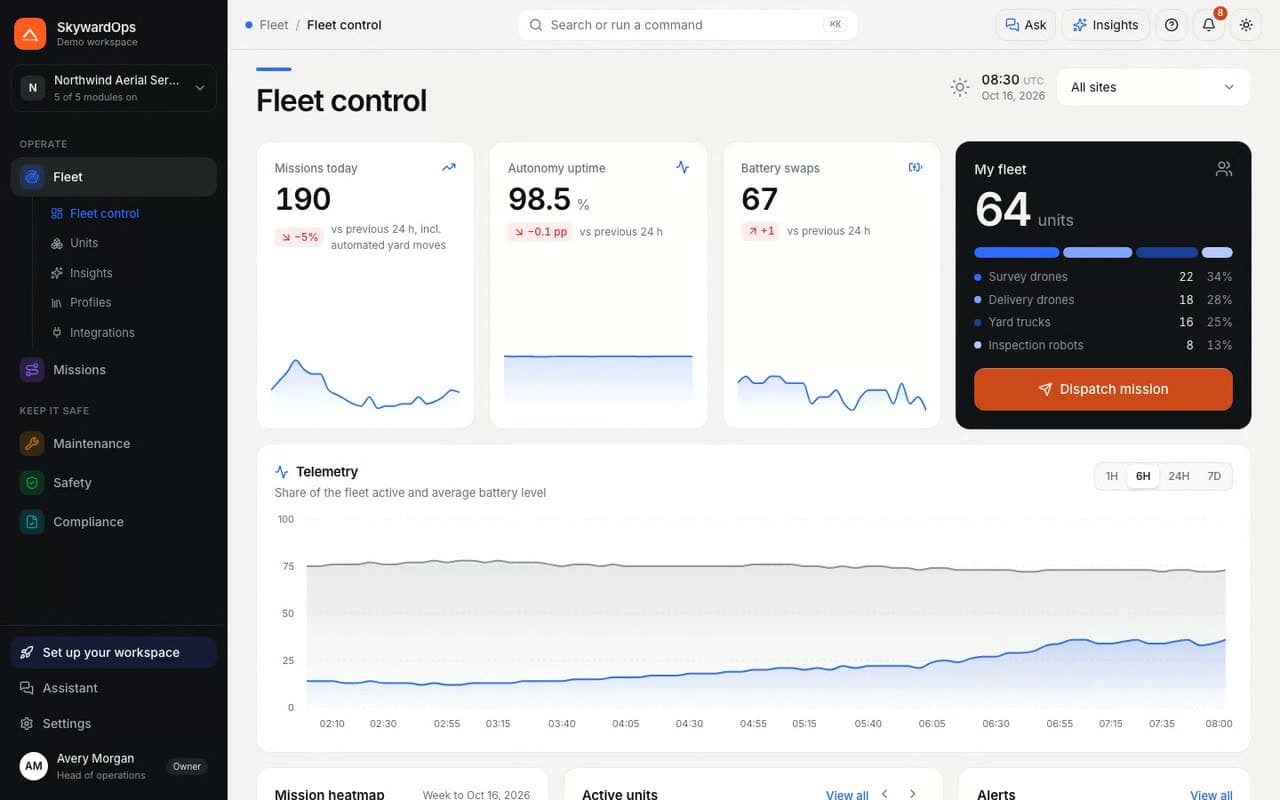
Fleet control in the SkywardOps demo: missions today, autonomy uptime, battery swaps, the fleet mix, telemetry, mission heatmap, active units and alerts.

The problem

Six tools to answer “is the fleet ready?”

A mixed fleet usually means one console per vehicle maker, a battery spreadsheet, a paper logbook and repairs tracked in chat. Nobody sees the whole picture, so a grounded drone gets scheduled and a certificate runs out unnoticed.

SkywardOps puts every unit, mission, work order, alert and flight log on one screen, with the same rules for all of them.

  • DronesVendor console A
  • Yard trucksVendor console B
  • Inspection robotsVendor console C
  • BatteriesA shared spreadsheet
  • Flight logsA paper logbook
  • RepairsA group chat
All of it in SkywardOps, with one set of permissions

Five modules

Only the data you need, in four pages.

Each module has up to four pages. Below is what each page shows. Every image is a screenshot of the demo workspace.

Fleet

Every drone, truck and robot on one screen.

Fleet control
Missions today, autonomy uptime, battery swaps, the fleet mix, telemetry, a mission heatmap, active units and open alerts.
Units
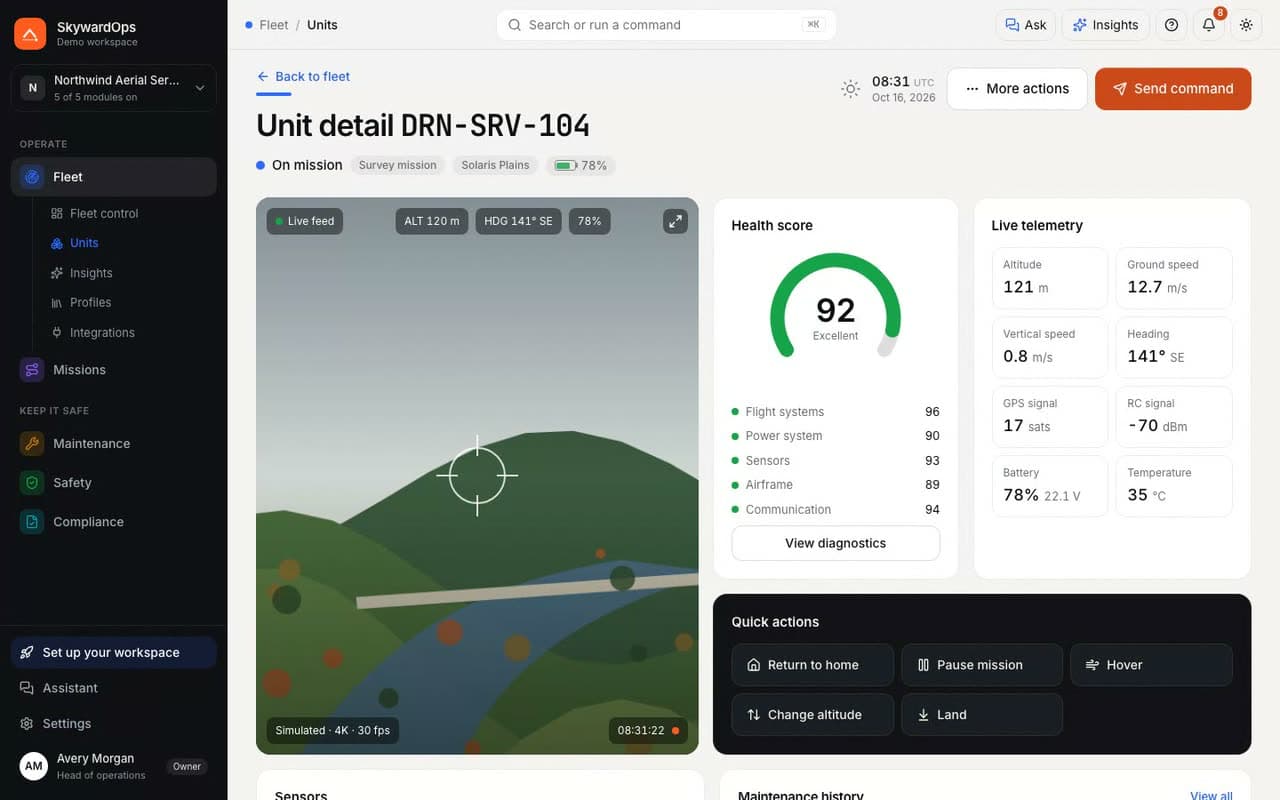
Every unit with site, status, battery, health score, flight hours, firmware and last contact; each opens to its camera, telemetry, sensors, current mission and maintenance history.
Insights
Units with falling health, repeated link loss, old firmware or deep battery discharges, with the evidence.
Profiles
Limits, payloads and endurance per unit type.
Integrations
The connectors this module takes data from, with status, last sync and what each one feeds in.

Integrations

The Fleet module
Fleet control in the SkywardOps demo: missions today, autonomy uptime, battery swaps, the fleet mix, telemetry, mission heatmap, active units and alerts.
Missions

Plan the route before anything takes off.

Planner
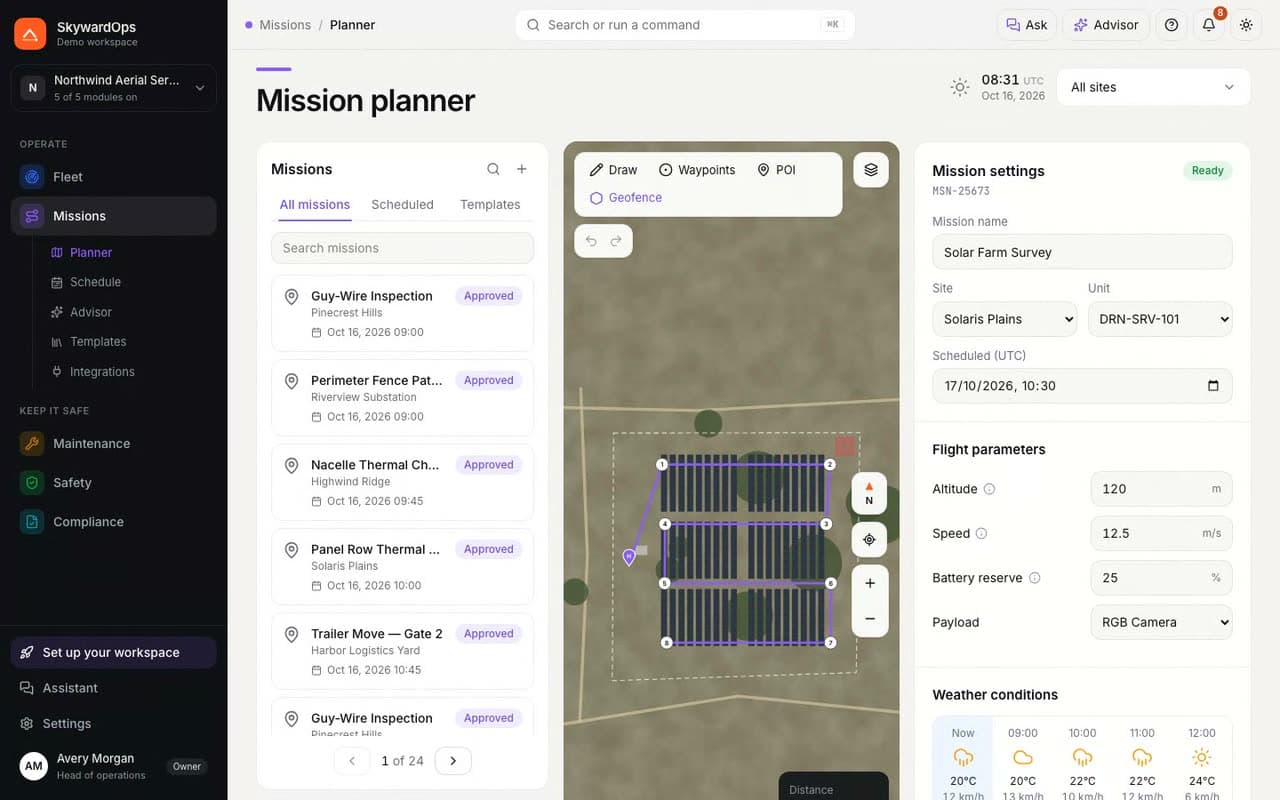
Upcoming missions, the route on the site map, flight parameters, hourly weather and preflight checks.
Schedule
A launch pipeline for the next 14 days, how missions ended, missions per day, and every mission with date, site, unit, status, distance, duration and outcome.
Advisor
Go / no-go per upcoming mission, with the reasons: wind, battery, unit state and geofences.
Templates
Saved mission patterns with their altitude, speed, payload and battery reserve.
Integrations
The connectors this module takes data from, with status, last sync and what each one feeds in.

Integrations

The Missions module
Mission planner in the demo: upcoming missions, the Solar Farm Survey route on the site map, flight parameters, hourly weather and preflight status.
Maintenance

Keep units airworthy, with a second pair of eyes.

Overview
Units by state (grounded, in the hangar, service due, cleared), parts and labour spend by work type, the service runway and the sign-off queue.
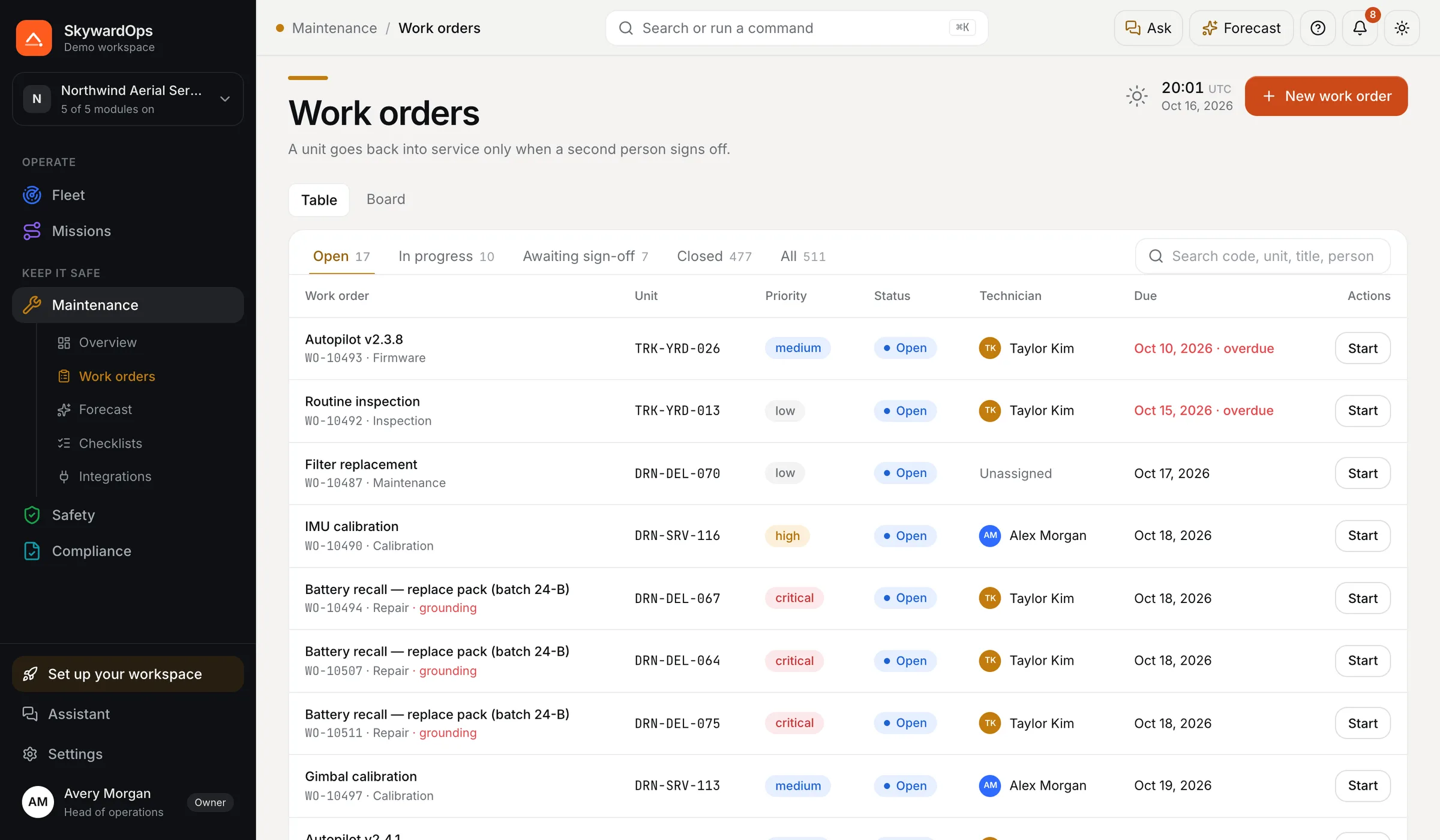
Work orders
Each work order with unit, priority, status, technician, due date and who signed it off.
Forecast
Predicted service date, likely component and confidence per unit.
Checklists
Inspection and calibration steps per unit type.
Integrations
The connectors this module takes data from, with status, last sync and what each one feeds in.

Integrations

The Maintenance module
Work orders in the demo: unit, priority, status, technician and due date for each order.
Safety

Alerts, incidents and geofences in one place.

Overview
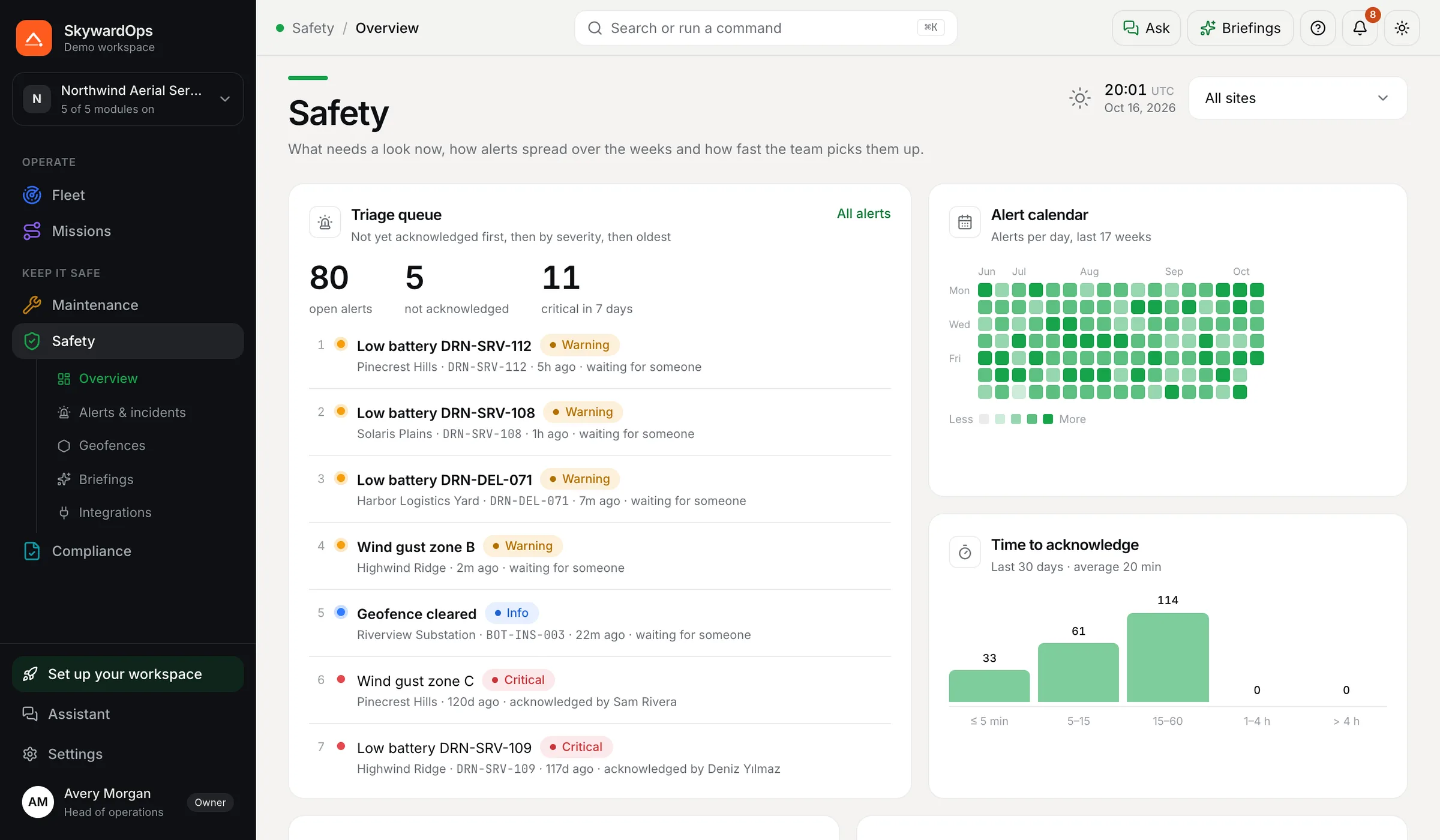
A triage queue of open alerts, an alert calendar, time to acknowledge, open incidents and alert sources.
Alerts & incidents
Each alert with severity, site, unit, time and who acknowledged it, plus incident files.
Geofences
Keep-in, keep-out and caution zones on each site map.
Briefings
Per site: wind for the next hours, open alerts, planned missions and active zones.
Integrations
The connectors this module takes data from, with status, last sync and what each one feeds in.

Integrations

The Safety module
Safety overview in the demo: open alerts, critical alerts, incidents, alerts per day by severity.
Compliance

Flight logs and pilot currency, ready for an audit.

Overview
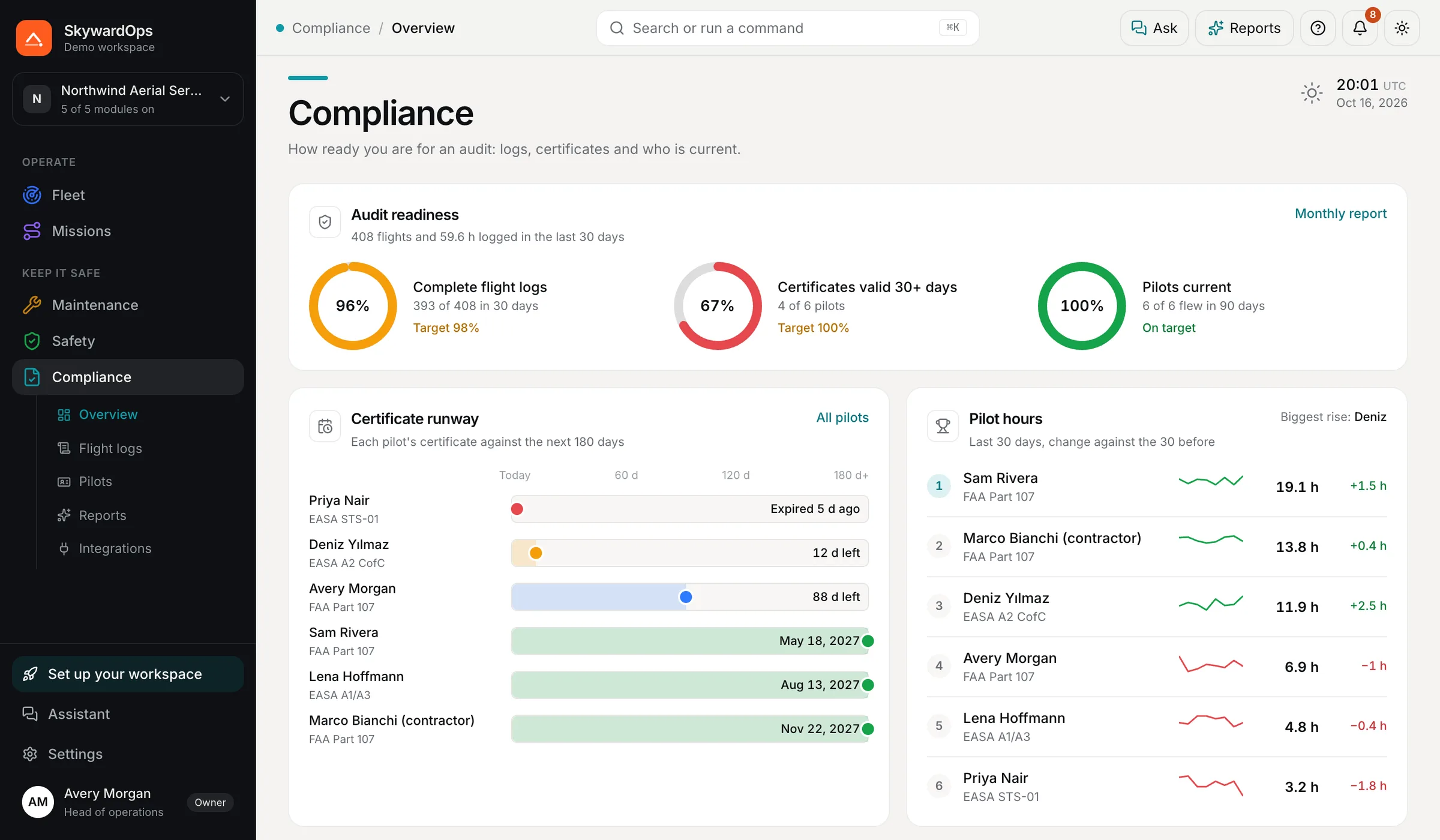
Readiness goals (complete logs, valid certificates, pilots current), a certificate runway and pilot hours with change.
Flight logs
Every flight with unit, site, pilot, duration, distance and maximum altitude.
Pilots
Certificate, number, expiry and hours per pilot.
Reports
The month’s flights, hours, incidents, certificates and maintenance as a draft report.
Integrations
The connectors this module takes data from, with status, last sync and what each one feeds in.

Integrations

The Compliance module
Compliance overview in the demo: flights and flight hours for 30 days, certificates expiring and hours by pilot.

How it works

Plan, launch, watch, maintain.

  1. 01

    Plan

    Draw the route on the site map with waypoints, POIs and geofences. Set altitude, speed, payload and battery reserve, and check the hourly weather window.

  2. 02

    Launch

    Preflight checks run against the unit and the plan. Someone with launch rights approves, then a pilot launches. Grounded units are not offered.

  3. 03

    Watch

    Open any unit for its camera with HUD, health score, sensors and mission progress. Return home, pause, hover, change altitude or land from the same screen.

  4. 04

    Maintain

    Work orders, firmware and service intervals by flight hours. A unit goes back into service only after a second person signs it off.

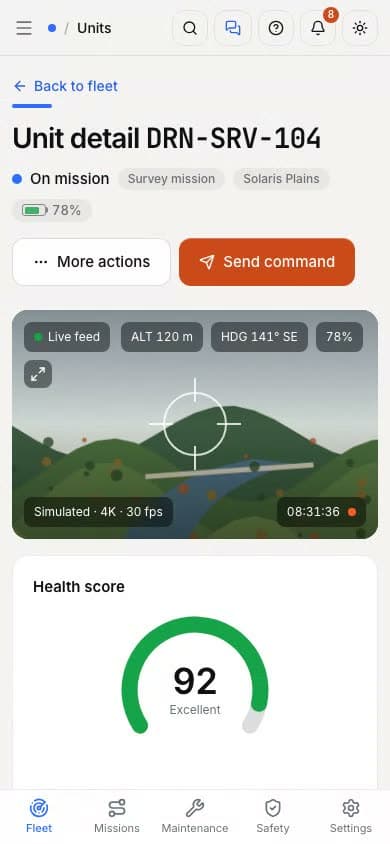
Unit detail for DRN-SRV-104 in the demo: simulated camera feed, health score, telemetry, quick actions, sensors, current mission and maintenance history.
Unit detail for DRN-SRV-104 on a phone: status, camera feed and health.

Safety and trust

The rules live in the database, not in a policy PDF.

Every rule below is checked by Postgres on every write, whether the change comes from the app, an API call or an agent. Each one has a test that tries to break it.

Approval before launch

A mission needs an approval from someone with launch rights. No launch with a grounded unit, a battery reserve under 20 % or an altitude above 120 m without a waiver.

Four-eyes release

The technician who did the work cannot release the unit. A maintenance lead has to sign it off.

Append-only flight logs

A flight log is written when a mission ends. Nobody can edit or delete it afterwards, owners included.

Agents never launch

AI agents draft missions, flag anomalies and propose maintenance. They cannot launch, approve, send commands or sign off.

The 120 m and 20 % limits are defaults, not legal advice. Check the rules where you fly.

Pricing

Per module, sized by fleet.

From $13.20/mo, billed annually1 week free

Modules start at $13.20/mo, billed annually. The Ops Suite with all five starts at $157.52/mo, and industry packs bundle four or five modules with a shared AI pool. Every plan is a 12-month term.

Every plan starts with 1 week free (one trial per customer): $0 today, cancel during the week and pay nothing. After the trial, prices are per month, billed annually: a 12-month minimum term, charged up front on day 7, with no refunds. You can cancel the renewal at any time before the renewal date. Cancellation & refund policy

  • Hobby
    1 seat · 1 unit
    5 modules · Suite $60.72/mo
    1 week free
  • Starter
    Up to 10 units
    5 modules · Suite $157.52/mo
    1 week free
  • Team
    Up to 50 units
    5 modules · Suite $254.32/mo
    1 week free
  • Fleet
    Up to 200 units
    5 modules · per module
    1 week free

FAQ

Questions

Does it talk to my drones and robots today?

Not yet. This build runs on simulated telemetry and a generated camera feed. The connectors are designed and mocked: ROS 2 bridge, PX4 / MAVLink, DJI Cloud API, WebRTC video relay. Each one gets checked against the vendor before a pilot customer.

What is in the demo?

Northwind Aerial Services: 64 units over 8 sites (solar, wind, pipeline, quarry, towers, substation, bridge and a logistics yard), with 120 days of history. No sign-in, and nothing you do leaves your machine.

Can I buy one module?

Yes. Every module is sold on its own: Hobby (1 seat, 1 unit), Starter (up to 10 units), Team (up to 50 units), Fleet (up to 200 units). Hobby is a paid plan. There is no free tier. The Ops Suite bundles all five, and 4 industry packs bundle four or five modules with a shared AI pool, on Starter and Team.

What does the AI add-on do?

It adds the AI page to a module: fleet insights, a go / no-go advisor, a maintenance forecast, shift briefings and report drafts. It is priced per module, from $16.72/mo, billed annually. Industry packs include a shared AI pool instead. Suggestions stay drafts until a person acts on them.

Is the checkout real?

No. The store on this site is a demo: no payment is taken and nothing is charged. It signs an entitlement and sends it to your local app, so you can see a module switch on.

How does the free trial work?

Every plan starts with 1 week free: a 7-day free trial, one per customer. At checkout you add your payment details and agree to the terms, and $0 is charged that day. On day 7 the first annual payment is taken and the 12-month term starts. To stop before then, cancel the trial in the app under Settings → Modules & billing → Cancel trial, and nothing is charged. If you already used a trial, a new order is charged the annual price on the day you place it.

How does billing work?

Prices are shown per month, but every plan is a 12-month minimum term, billed annually up front: on day 7, when the free trial ends. The term renews each year on its renewal date unless you cancel the renewal before then. There is no month-to-month option. The per-month price is the list price minus 12 %, which is the only yearly discount; bigger savings come from the Ops Suite and the industry packs.

Can I get a refund?

No, not after the trial. During the 7-day free trial nothing has been charged, so cancelling the trial costs nothing. Once the first annual payment is taken on day 7, payments are not refunded, including for unused time. You can cancel the renewal at any time before the renewal date (in the app under Settings → Modules & billing); access then runs to the end of the term you paid for.

What happens if a renewal payment fails?

Seven days of grace with full access, then read-only until day 30, then the module is locked. Data is kept for 90 days after that.
See Northwind’s fleet for yourself.

64 units, 8 sites, one drone surveying Eldorado Valley Solar right now.